Author: DanijelaB

  • Why AI Pilots Fail When They Reach Daily Operations

    Why AI Pilots Fail When They Reach Daily Operations

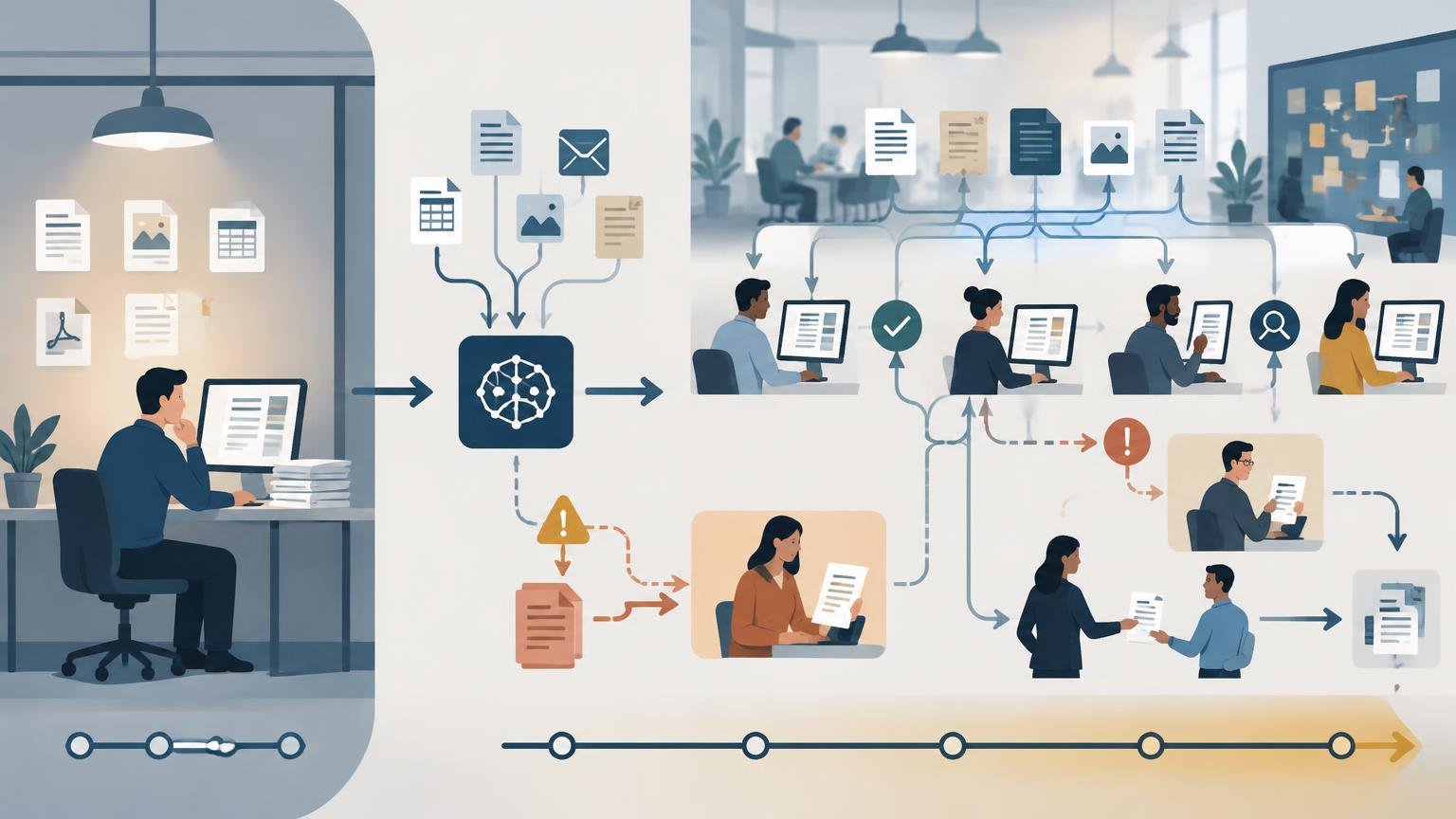
    An AI pilot can produce an impressive demonstration and still struggle as a daily business process.

    A pilot usually tests whether a tool can perform a task under selected conditions. Daily operations require something broader. The process must work repeatedly, with changing inputs, different users, time pressure, exceptions, quality controls and clear responsibility.

    Operational design problems can contribute to an AI pilot failing in daily use. The model may be capable, but the workflow may be incomplete, the data inconsistent, final responsibility unclear or the expected value insufficiently defined. These are practical considerations, not a universal explanation for every pilot outcome.

    This distinction matters for small businesses, marketing teams, operations teams and CRM professionals. A useful pilot is not merely a successful demonstration. It is a structured test of whether an AI-supported process can deliver acceptable value under realistic operating conditions.

    The recommendations in this article are practical editorial guidance. The cited NIST AI Risk Management Framework provides related guidance on responsibilities, data suitability, human oversight, deployment-like measurement, production monitoring and response planning. It does not establish that these factors cause a particular failure rate or explain every AI pilot outcome.[1]

    A pilot is not the same as an operational system

    A pilot often has characteristics that make success easier:

    • A small number of carefully selected examples
    • A motivated person who understands the tool
    • Extra time to check and correct outputs
    • Clean or manually prepared data
    • A narrow use case
    • Few exceptions
    • Close attention from the person running the test

    Daily operations may instead involve incomplete information, multiple contributors, deadlines, unusual cases, changing products or policies, manual handoffs and uncertainty about who is accountable for mistakes.

    NIST recommends assessing AI performance in conditions resembling deployment and monitoring behavior in production.[1] In practical terms, a pilot can answer, โ€œCan this work in a controlled example?โ€ without answering:

    • Who will use it and at what point in the process?
    • What happens when the output is wrong or incomplete?
    • Who reviews the result?
    • How will the team know whether it is creating value?
    • What happens when the tool, data or business rules change?

    If these questions are not addressed, the pilot may create enthusiasm without creating a dependable process.

    Operational issues to examine before expanding an AI pilot

    1. The pilot starts with a tool instead of a business problem

    A team may begin with a new AI application and then search for something interesting to do with it. This can produce a demonstration, but not necessarily a valuable workflow.

    Instead of asking, โ€œHow can we use an AI assistant to generate more content?โ€ a stronger starting point is: โ€œWhich part of our content process is slow, repetitive or difficult to scale, and what quality level must be maintained?โ€

    The second question may reveal that the real issue is gathering source material, unclear approvals, incomplete briefs or adapting an approved message across channels. AI may help with one part of that process, but the tool is not the process itself.

    2. The pilot uses ideal inputs

    A demonstration often uses information that has already been cleaned and organized. A CRM-related pilot might work with complete spreadsheet records, while daily use involves missing fields, inconsistent names, old information, duplicates, ambiguous notes or conflicting sources.

    The process therefore needs an explicit input policy. Define required fields, acceptable formats, handling for missing information, conditions that should stop the workflow or request clarification, and responsibility for recurring data problems. NISTโ€™s guidance on data selection, suitability and representativeness is relevant here, particularly MAP 2.3.[1]

    3. No one owns the final decision

    An AI system may generate a recommendation, summary, classification or draft without the team agreeing who accepts, changes or rejects it. People may assume someone else checked the result, approve without understanding limitations or avoid the workflow because responsibility feels unclear.

    Define what the reviewer checks and who makes the final decision. Also specify which errors require correction, which cases must be escalated and where the decision is recorded. NISTโ€™s guidance on documented responsibilities and communication about AI risks is relevant to this design, including GOVERN 2.1.[1]

    Oversight is a practical control, not a guarantee of correct outputs. A reviewer still needs sufficient time, context and authority to identify and address problems.

    4. The pilot measures output quality but not business value

    Asking whether an AI-generated output โ€œlooks goodโ€ is a useful starting point, but it is not enough to justify an operational workflow. Depending on the use case, evaluation may include time per item, major-edit rate, completion within the target time, rework, adoption, review completion, operating cost and a relevant business outcome.

    The complete review and correction effort should be included. Whether review effort offsets time saved is an evaluation criterion, not an assumption. NISTโ€™s measurement guidance, including MEASURE 2.3 and MEASURE 2.4, supports evaluating performance and its context rather than relying on a single output-quality impression.[1]

    5. The workflow creates more work than it removes

    Generating a draft may be fast, but users may then need to verify claims, rewrite the tone, check formatting, compare the output with source documents, remove confidential information or resolve inconsistencies.

    Treat the possibility that review and correction could outweigh the original effort as a test condition. Compare the old and AI-supported workflows from intake through final approval, rather than measuring only the time spent generating the first output.

    6. Exceptions were excluded from the design

    A process that handles only the normal case may not be ready for daily operations. Exceptions can include an uncategorized customer request, contradictory campaign instructions, sensitive information, outdated source material, an output below the quality threshold or a decision outside the teamโ€™s authority.

    Define whether the workflow should stop, request more information, route the case to a named specialist, continue with a warning, use a manual process or record the exception for improvement. The appropriate control depends on risk, sensitivity, volume and the consequences of an error. NISTโ€™s guidance on monitoring, overrides, incident response and recovery is relevant here, including MANAGE 4.1.[1]

    A workflow does not need to handle every case automatically. It does need to make uncertain cases visible and manageable.

    7. The process depends on one enthusiastic person

    A pilot may depend heavily on one person who understands the tool, knows the business context and compensates for weaknesses manually. That person may clean inputs, rewrite prompts, notice unreliable results, remember undocumented workarounds and explain the process to others.

    If the workflow is expanded, document its purpose, required inputs, standard steps, review criteria, escalation rules, known limitations and examples of acceptable and unacceptable outputs. The documentation needs to be usable by the people expected to perform the work.

    8. The workflow is disconnected from existing systems

    An AI tool may work well in isolation but create friction when users copy information between applications. Manual transfer can lead to wrong records, lost context, stale source systems, duplicates and delayed next steps.

    The appropriate level of integration depends on risk, sensitivity, volume, user needs and integration requirements. Ask where the request begins, where the output goes, which system is the source of truth, who updates the record, how completion is confirmed and what happens if the transfer fails.

    If these answers are unclear, the pilot is testing a tool in isolation rather than testing the operational process.

    9. The team ignores change over time

    Offers, customer questions, internal policies and source information change. An AI workflow may continue producing plausible outputs after its instructions or reference material become outdated.

    Define who reviews instructions and source material, how often the workflow is checked, what events trigger an early review, how feedback and errors are recorded, and who approves changes. NIST recommends monitoring system behavior in production and planning how issues will be managed.[1]

    Practical example: an AI content workflow

    The following is a hypothetical illustration, not a documented DaniLabb customer result or a research finding.

    Imagine a small marketing team testing an AI workflow to turn a long product briefing into a draft email, social post and short article outline.

    What the pilot tests

    The team provides a clean briefing with the target audience, a clear offer, approved product information, a defined tone and a call to action. The AI produces drafts quickly, the team makes a few edits and the concept looks promising.

    What might happen in daily operations

    New briefs arrive from different people. Some omit the target audience. Others contain unapproved claims. A product detail changes, but the shared reference document is not updated. The reviewer is unavailable on a deadline.

    The workflow now needs a standard brief, required fields, a source of truth for approved claims, a review checklist, a named approver, a process for missing or conflicting information and a record of the source-material version used.

    This illustration does not establish that the workflow failed or identify a documented cause. It shows how operating conditions could create additional requirements even when an initial writing demonstration is promising.

    How to design a pilot that can move toward operations
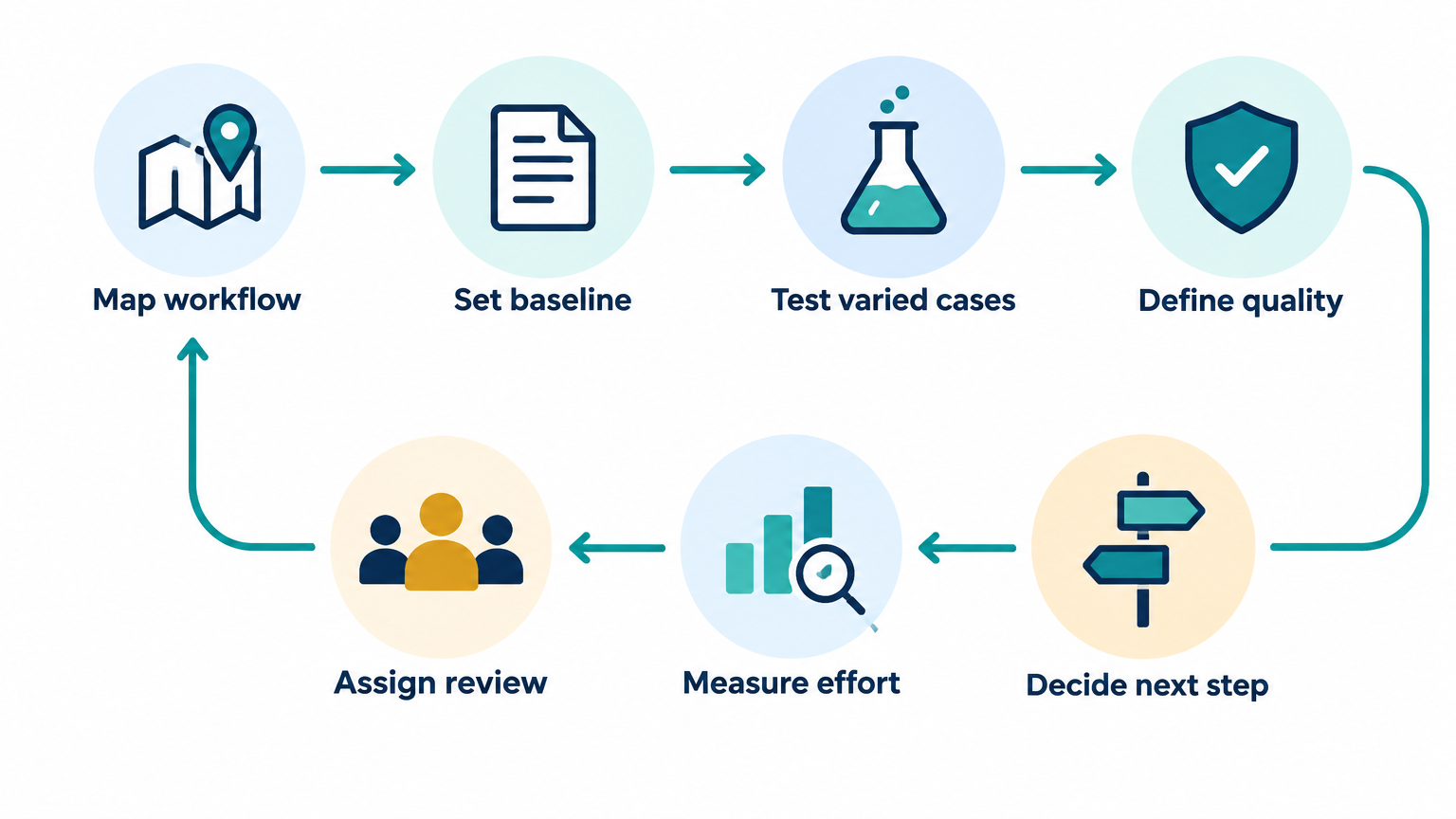
    AI pilot design process: workflow mapping, baseline, varied-case testing, quality standards, review, effort and decisions.
    1. Map the process before selecting the tool: identify the trigger, inputs, decisions, output, reviewer, storage location and next step.
    2. Establish a baseline for time, people involved, rework, quality problems and volume.
    3. Test normal, incomplete, ambiguous, outdated, conflicting, rejectable and escalation cases.
    4. Define quality standards before reviewing results.
    5. Assign review and escalation responsibilities appropriate to the workflowโ€™s risk.
    6. Measure total effort from request through approved result, not generation time alone.
    7. Observe intended users operating the workflow under ordinary conditions.
    8. Decide whether to continue, make specific changes, narrow the use case or stop.

    A simple operational readiness checklist
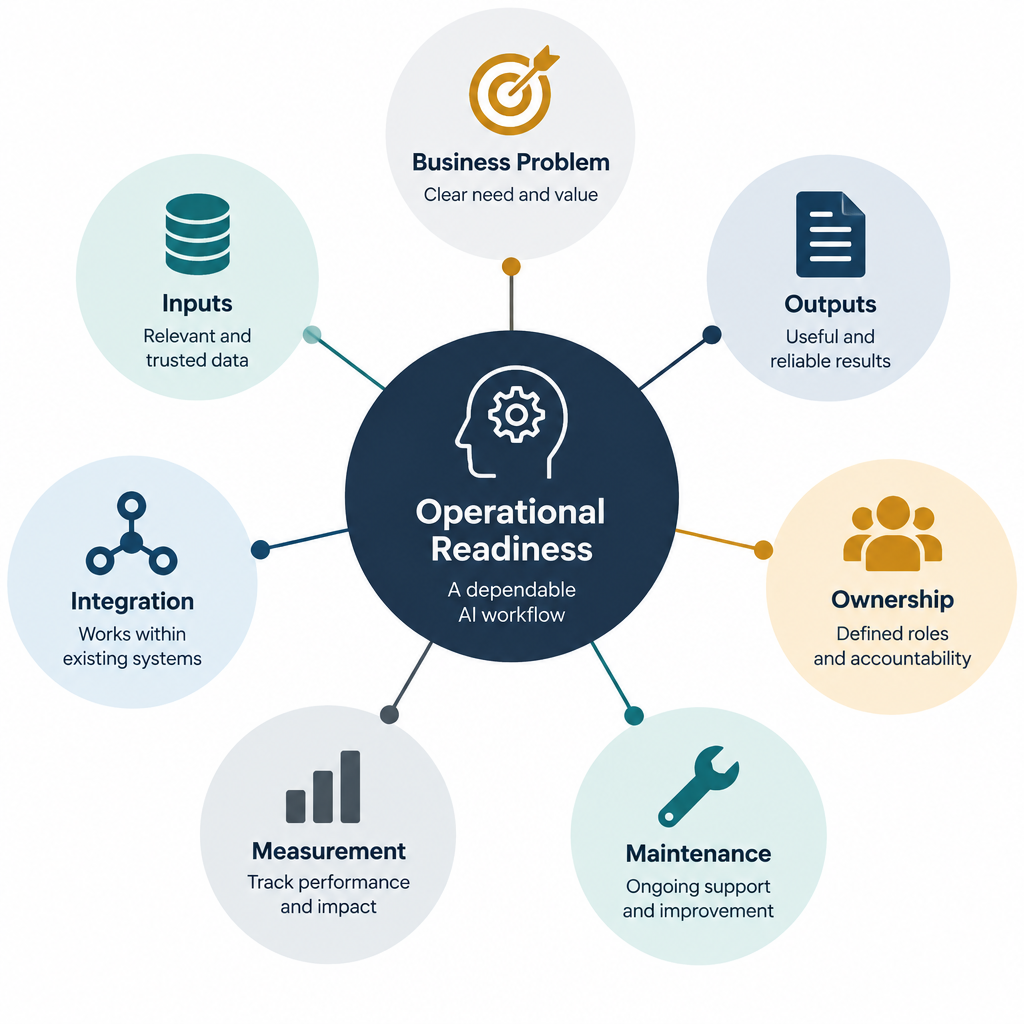
    Operational readiness diagram organized around business problem, inputs, outputs, ownership, integration, measurement and maintenance.

    Before moving an AI pilot into regular use, ask:

    Business problem

    • Is the problem clearly defined?
    • Is the AI-supported step connected to a meaningful business objective?
    • Is there a baseline for comparison?

    Inputs

    • Are required inputs defined?
    • Can the workflow detect missing or conflicting information?
    • Is sensitive information handled appropriately?

    Outputs

    • What does an acceptable output look like?
    • Which errors are unacceptable?
    • Can users correct the output efficiently?

    Ownership

    • Who owns the process?
    • Who reviews the output?
    • Who handles exceptions?
    • Who approves changes to the workflow?

    Integration

    • Where does the workflow begin and end?
    • Which system is the source of truth?
    • Are handoffs documented?

    Measurement

    • What will be measured?
    • How will quality, effort and value be compared with the baseline?
    • What result would justify continuing?

    Maintenance

    • How will changes in source information be managed?
    • How will errors and feedback be recorded?
    • When will the workflow be reviewed?

    If several answers are unclear, the pilot may need more process design before it needs more technology.

    What small businesses should do first

    Small businesses can start with one narrow, repeatable workflow that has a visible business problem, manageable risk, a clear owner, enough volume to observe patterns and a realistic way to review results against the current process. The best first use case is often not the most impressive; it is the one that can be tested safely and connected to a clear operational outcome.

    Final takeaway

    When an AI pilot struggles in daily operations, the issue may be the surrounding process rather than the tool alone. Map the work, test realistic cases, define review responsibilities and measure the complete process before expanding. If you are evaluating an AI learning need or considering an AI project, contact DaniLabb to discuss your learning needs or an AI project.

    References

    [1] National Institute of Standards and Technology (NIST), Artificial Intelligence Risk Management Framework (AI RMF 1.0), NIST AI 100-1, January 2023. https://nvlpubs.nist.gov/nistpubs/ai/NIST.AI.100-1.pdf
  • Why AI Business Systems Need Human Verification

    Why AI Business Systems Need Human Verification

    AI can draft a marketing email, summarize a customer conversation, classify a support request or recommend the next action in a workflow. These capabilities can reduce repetitive work and help small teams move faster.

    But an AI output is not automatically a business-ready decision.

    An AI business system needs human verification because the system may misunderstand the input, produce a plausible but incorrect answer, miss important context or take an action that is difficult to reverse. The more directly an AI workflow affects customers, money, compliance, reputation or business operations, the more important verification becomes.

    Human verification does not mean rejecting automation. It means designing the workflow so that people remain responsible for decisions that require judgment, context or accountability.

    The difference between AI assistance and AI authority

    A useful starting point is to distinguish between two roles for AI:

    • AI assistance: The system prepares, summarizes, recommends or drafts something for a person to review.
    • AI authority: The system makes a decision or takes an action without meaningful human review.

    AI assistance is often easier to introduce because the human remains the final decision-maker. For example, an AI system can draft a response to a customer complaint, while an employee checks the facts, tone and proposed solution before sending it.

    AI authority carries more risk. If an automated system changes a customerโ€™s account, rejects a request, sends a sensitive message or updates a business record incorrectly, the error may affect the customer and create follow-up work.

    The practical question is not simply:

    โ€œCan this task be automated?โ€

    A better question is:

    โ€œWhich parts of this task can AI prepare, and which parts require human judgment or approval?โ€

    Why AI outputs require verification

    1. AI can produce convincing errors

    AI-generated content often sounds confident even when it contains an incorrect detail. A draft may include a product feature that does not exist, an incorrect customer name, an unsupported claim or an inaccurate summary of a meeting.

    The problem is not always obvious. Spelling and grammar checks may pass while the business meaning is wrong.

    For example, an AI system that summarizes a sales call might state that a prospect agreed to a follow-up meeting when the prospect only said they would consider it. If the CRM is updated automatically, the sales team may treat an uncertain opportunity as a confirmed next step.

    2. AI may lack the context needed for a decision

    A model can only use the information provided to it or made available through connected systems. It may not know about an exception, an informal agreement, a recent policy change or a sensitive relationship with a customer.

    A workflow that appears simple may depend on context that is not stored in a structured field.

    For instance, an AI system may recommend sending a standard renewal message to every customer whose contract is approaching its end date. A human may know that one customer recently reported a service issue and should receive a more personal response first.

    3. Business rules are often more specific than prompts

    A general instruction such as โ€œprioritize high-value leadsโ€ is not enough to define a reliable business process. What counts as high value? Is the value based on revenue, strategic importance, urgency or likelihood to buy? What happens when the available information is incomplete?

    If business rules are vague, the system may apply its own interpretation. Human verification can identify cases where the output does not match the organizationโ€™s actual process.

    4. Errors can propagate through connected systems

    An incorrect AI output is more serious when it triggers additional actions.

    Consider a workflow like this:

    1. AI reads an inbound message.
    2. AI classifies the request.
    3. The classification updates the CRM.
    4. The CRM triggers a task or email.
    5. A reporting dashboard uses the updated data.

    A mistake at the first step can affect several later steps. By the time someone notices the issue, the original context may be difficult to reconstruct.

    5. Some actions are difficult to reverse

    A draft document can usually be edited. A public post, customer email, payment instruction or deleted record may be more difficult to undo.

    Verification should therefore be strongest before actions that:

    • communicate externally;
    • change customer or financial records;
    • create legal, compliance or contractual implications;
    • expose confidential information;
    • affect pricing, eligibility or access;
    • create reputational risk;
    • trigger other automated processes.

    Human verification is a workflow design problem

    Human review should not be added as an afterthought. It should be designed into the workflow from the beginning.

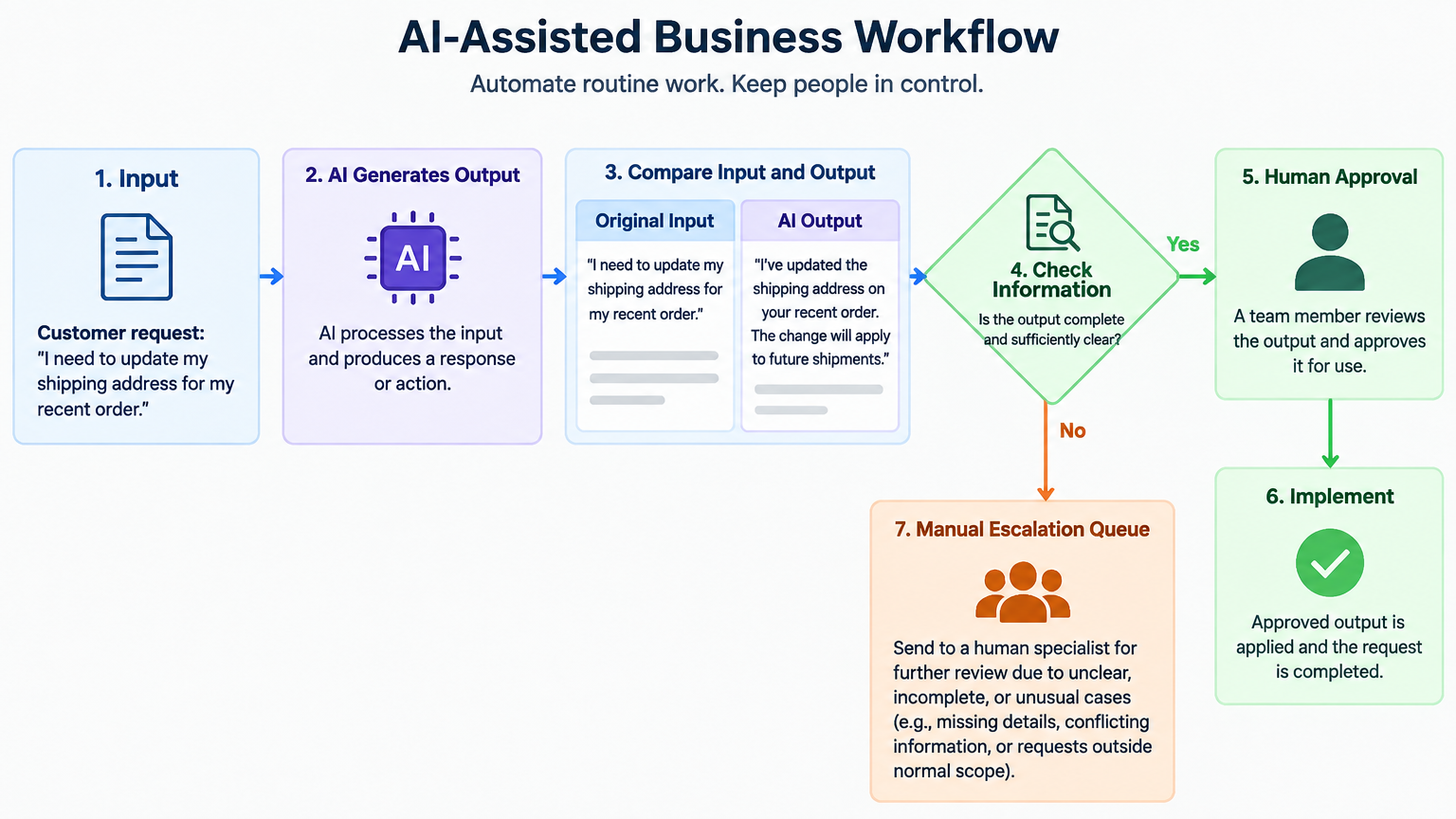
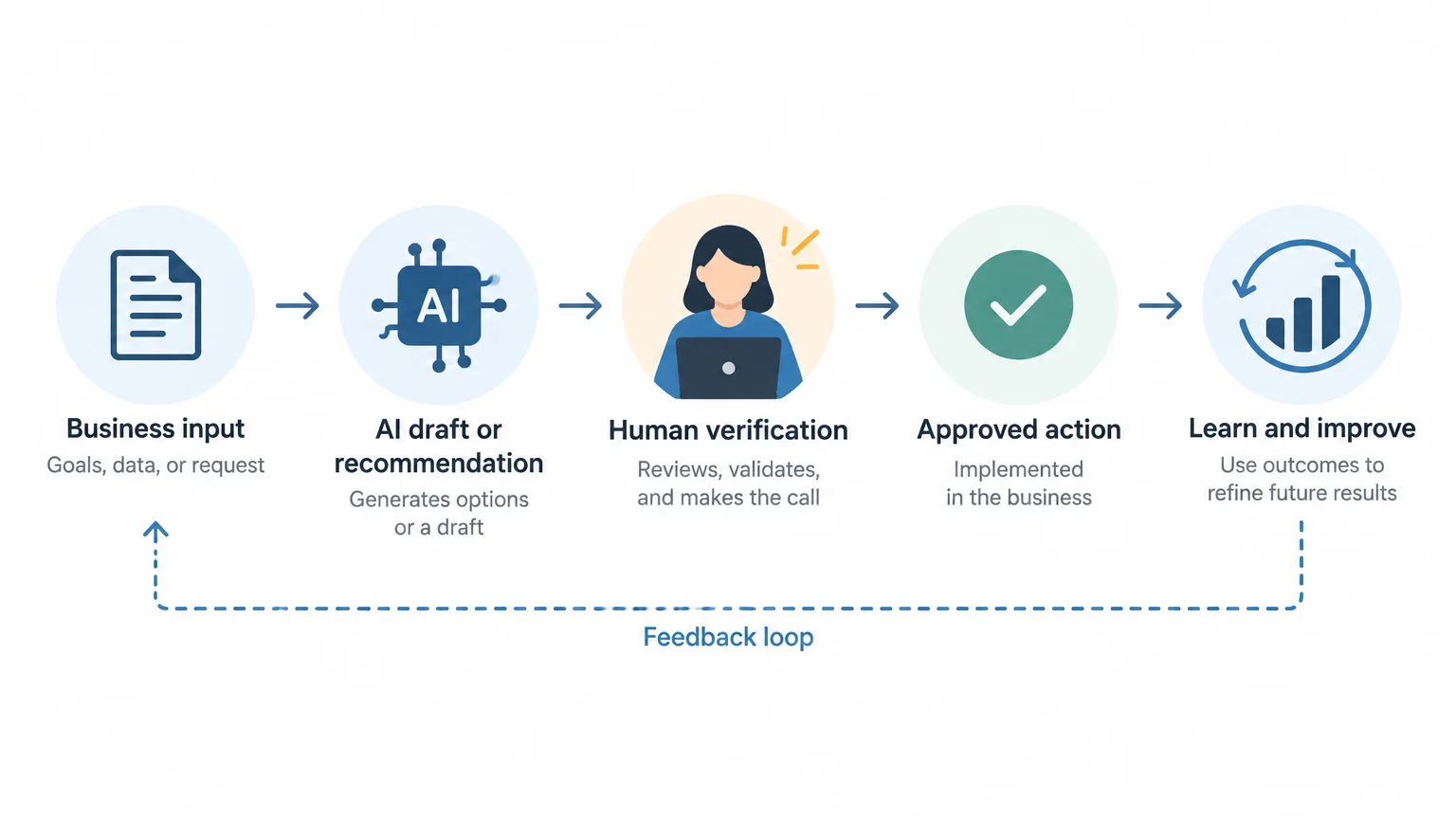
    A basic AI-assisted process might look like this:

    Business input
        โ†“
    AI prepares a draft, classification or recommendation
        โ†“
    System shows the source information and proposed output
        โ†“
    Human verifies relevant details
        โ†“
    Human approves, edits or rejects the output
        โ†“
    Approved action is completed
        โ†“
    Outcome is recorded for later improvement
    

    The important feature is that the reviewer can see enough information to make a meaningful decision. A simple โ€œapproveโ€ button is not sufficient if the person cannot see the source message, relevant customer details or the rules behind the recommendation.

    What should a human verify?

    The verification checklist depends on the task, but the following categories are useful.

    Accuracy

    • Are names, dates, amounts and product details correct?
    • Does the summary reflect the source material?
    • Has the AI introduced information that was not provided?

    Relevance

    • Does the recommendation address the actual business problem?
    • Is the proposed action appropriate for this customer or situation?
    • Has the system confused similar requests or records?

    Completeness

    • Are important exceptions missing?
    • Did the AI overlook a customer question or operational requirement?
    • Are required fields, approvals or attachments present?

    Tone and clarity

    • Is the language appropriate for the audience?
    • Could the message be misunderstood?
    • Does it sound like the organization and reflect its policies?

    Privacy and confidentiality

    • Does the output reveal information to someone who should not receive it?
    • Has sensitive data been copied into an inappropriate message or record?
    • Is the workflow using only the information necessary for the task?

    Business impact

    • What happens if this output is wrong?
    • Is the action reversible?
    • Should a specialist or manager review it before completion?

    Use risk-based verification instead of reviewing everything equally

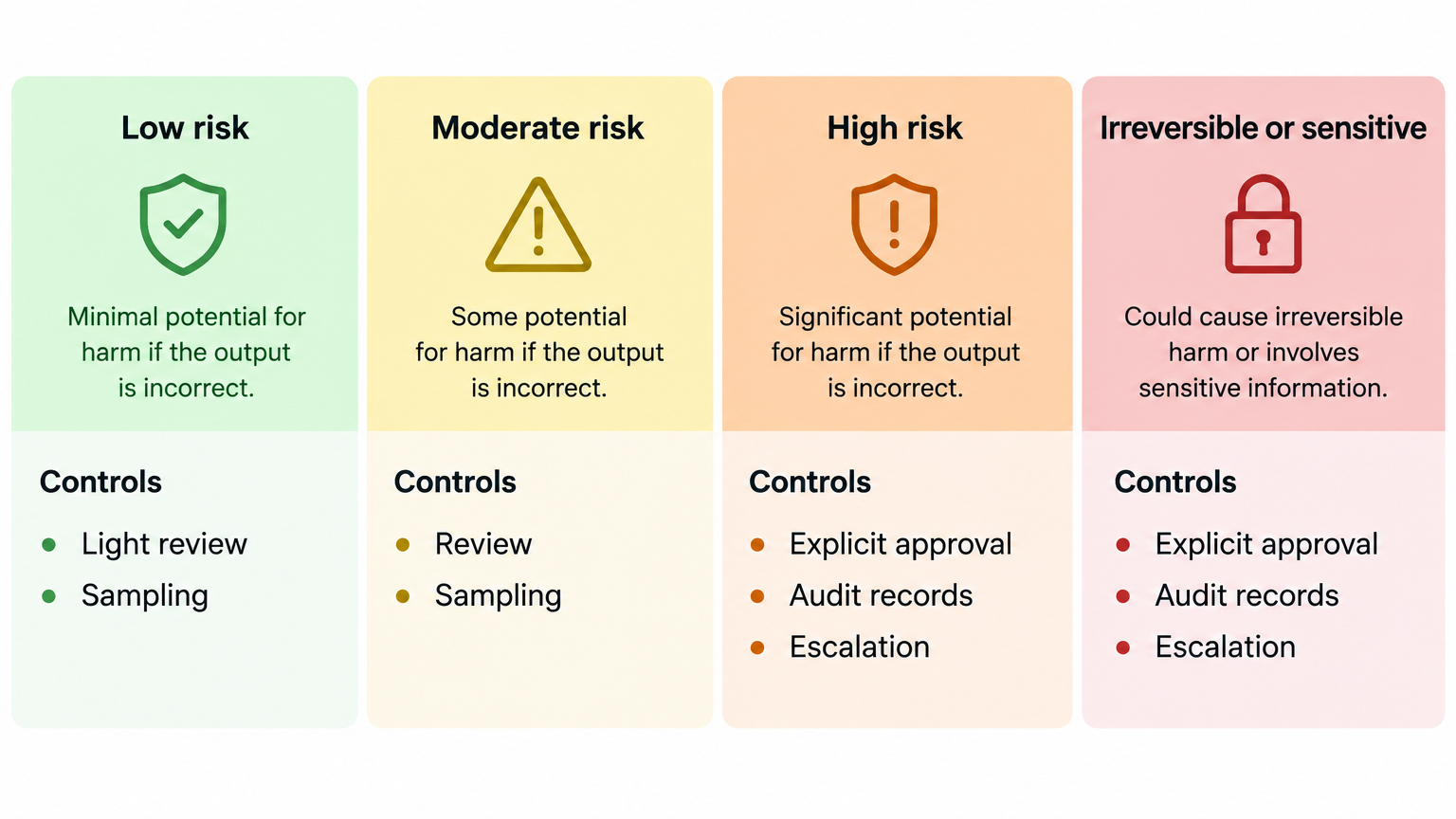
    Risk spectrum showing increasing review controls for low-risk, moderate-risk, high-risk, and sensitive AI workflows.

    Reviewing every low-risk output in the same way can make automation impractical. A better approach is to classify workflows according to their potential impact.

    Workflow type Example Suggested control
    Low risk Internal brainstorming or first-draft copy Light review and occasional sampling
    Moderate risk CRM categorization or customer-response drafts Human review before updating or sending
    High risk Pricing changes, financial instructions or access decisions Named approver, documented checks and no automatic execution without approval
    Irreversible or sensitive Public publication, deletion, confidential disclosures Explicit approval, audit record and clear escalation path

    The categories should reflect the business, not a generic template. A small business may consider a particular customer email high risk because of an important relationship, even if the workflow would appear routine elsewhere.

    Practical examples of human-in-the-loop systems

    Example 1: AI-generated marketing content

    An AI system can turn a campaign brief into social media posts, email copy and a blog outline.

    Human verification should confirm:

    • the claims are supported by the actual offer;
    • prices, dates and conditions are correct;
    • the content matches the intended audience;
    • the wording does not create an unintended promise;
    • the final version meets brand and legal requirements.

    A useful workflow is to have AI generate several alternatives, while a marketer selects and edits the final version. The AI speeds up ideation and drafting, but the business retains control over what it publishes.

    Example 2: CRM activity summarization

    An AI system can summarize sales calls and suggest follow-up tasks.

    The salesperson should verify:

    • what the prospect actually agreed to do;
    • the timing of the next step;
    • the people involved in the decision;
    • objections or requirements that need to be recorded;
    • whether the suggested task is appropriate.

    Only after this review should the summary update the CRM or create a task for another team member.

    Example 3: Customer support triage

    AI can categorize inbound requests and suggest priorities. It may identify a billing question, a technical issue or a cancellation request.

    Human review is especially important when:

    • the message is ambiguous;
    • the customer appears distressed or dissatisfied;
    • the request involves a refund, account access or sensitive information;
    • the classification would determine response time or escalation;
    • the system has low confidence or lacks relevant information.

    The system should have a clear fallback category such as โ€œneeds human assessment.โ€ Forcing every message into an automated category can create more risk than leaving some requests for manual handling.

    Design for uncertainty and escalation

    Decision flow routing clear AI outputs to approval and uncertain or incomplete cases to manual escalation.

    A reliable AI workflow should have a way to express uncertainty. Not every output should be treated as equally reliable.

    Possible controls include:

    • a confidence or completeness indicator;
    • required fields that must be present before an action can continue;
    • a second review for high-impact cases;
    • a manual escalation queue;
    • a rule that prevents external communication when key facts are missing;
    • a visible comparison between the original input and the AI-generated output.

    These controls do not guarantee that an answer is correct. They make uncertainty easier to notice and reduce the chance that an incomplete output will move through the system unnoticed.

    Verification should produce learning, not just delay

    When a person edits or rejects an AI output, that event is useful information. It can reveal:

    • unclear instructions;
    • missing business rules;
    • poor source data;
    • recurring exceptions;
    • tasks that should not be automated;
    • opportunities to improve the prompt or workflow.

    For example, if reviewers repeatedly change the same type of AI-generated customer response, the issue may not be the model. The workflow may lack an approved response structure, current product information or a rule for handling a specific customer segment.

    Track simple operational measures such as:

    • number of outputs reviewed;
    • number accepted without changes;
    • number edited;
    • number rejected or escalated;
    • common error categories;
    • time required for review;
    • incidents caused by incorrect outputs.

    These measures should be used for improvement, not to pressure employees into approving outputs quickly.

    Common mistakes when implementing verification

    Treating review as a rubber stamp

    If reviewers are expected to approve everything quickly, verification becomes a formality. The process should give them enough time, information and authority to reject an output.

    Showing the output without the source

    A reviewer cannot reliably check a summary or recommendation without access to the original message, record or document.

    Automating before defining the business rule

    If the team has not agreed on what a correct result looks like, adding AI will not resolve the ambiguity. Define the decision criteria first.

    Ignoring low-confidence or unusual cases

    Exceptional cases are often where the greatest risk exists. The workflow should route unusual inputs to a person rather than treating them as routine.

    Measuring only speed

    A faster workflow is not necessarily better if it creates correction work, customer complaints or inaccurate records. Measure quality and downstream impact as well as time saved.

    A practical starting plan for a small business

    A small business does not need a complex AI governance program to introduce human verification. Start with one workflow.

    Step 1: Choose a repetitive but bounded process

    Examples include drafting internal summaries, preparing first versions of customer replies or extracting structured information from standard documents.

    Step 2: Define what AI may and may not do

    Write down whether AI can draft, classify, recommend, update a record or send a message. Begin with preparation and recommendation before allowing automatic execution.

    Step 3: Identify the verification points

    Specify exactly what the reviewer must check. Avoid vague instructions such as โ€œmake sure it looks good.โ€

    Step 4: Add an escalation path

    Define what happens when information is missing, the output is uncertain or the case falls outside normal rules.

    Step 5: Test with real examples

    Use representative examples, including difficult and exceptional cases. Do not evaluate the workflow only on easy inputs.

    Step 6: Record corrections and review outcomes

    Use the results to improve instructions, source data, approval rules and process design.

    Step 7: Expand cautiously

    Only reduce the level of human review when the workflow has demonstrated acceptable performance for the specific business context and the remaining risks are understood.

    The goal is controlled automation

    Human verification is not an argument for keeping every task manual. It is a way to decide where automation is appropriate and where human judgment must remain involved.

    The strongest AI business systems usually combine:

    • automation for repetitive preparation;
    • clear business rules for routine decisions;
    • human judgment for exceptions and high-impact actions;
    • records of approvals and changes;
    • feedback loops for continuous improvement.

    For businesses adopting AI, the key capability is not simply learning how to produce outputs with a tool. It is learning how to design a dependable process around those outputs.

    Start with the business problem, define the acceptable result, place verification where risk requires it and measure what happens after implementation. That approach allows AI to create practical value without turning speed into avoidable risk.

    Final checklist

    Before deploying an AI-assisted business workflow, ask:

    • What business problem is this system solving?
    • What information does the AI need, and what information might be missing?
    • Which errors would matter most?
    • Is the output a draft, a recommendation or an automatic decision?
    • Where must a person review the result?
    • Can the reviewer see the source information?
    • What happens when the system is uncertain?
    • Which actions are difficult to reverse?
    • How will corrections and rejected outputs be recorded?
    • What evidence will show whether the workflow is improving the business?

    If these questions do not have clear answers, the workflow probably needs more process design before more automation.