AI can draft a marketing email, summarize a customer conversation, classify a support request or recommend the next action in a workflow. These capabilities can reduce repetitive work and help small teams move faster.
But an AI output is not automatically a business-ready decision.
An AI business system needs human verification because the system may misunderstand the input, produce a plausible but incorrect answer, miss important context or take an action that is difficult to reverse. The more directly an AI workflow affects customers, money, compliance, reputation or business operations, the more important verification becomes.
Human verification does not mean rejecting automation. It means designing the workflow so that people remain responsible for decisions that require judgment, context or accountability.
The difference between AI assistance and AI authority
A useful starting point is to distinguish between two roles for AI:
- AI assistance: The system prepares, summarizes, recommends or drafts something for a person to review.
- AI authority: The system makes a decision or takes an action without meaningful human review.
AI assistance is often easier to introduce because the human remains the final decision-maker. For example, an AI system can draft a response to a customer complaint, while an employee checks the facts, tone and proposed solution before sending it.
AI authority carries more risk. If an automated system changes a customer’s account, rejects a request, sends a sensitive message or updates a business record incorrectly, the error may affect the customer and create follow-up work.
The practical question is not simply:
“Can this task be automated?”
A better question is:
“Which parts of this task can AI prepare, and which parts require human judgment or approval?”
Why AI outputs require verification
1. AI can produce convincing errors
AI-generated content often sounds confident even when it contains an incorrect detail. A draft may include a product feature that does not exist, an incorrect customer name, an unsupported claim or an inaccurate summary of a meeting.
The problem is not always obvious. Spelling and grammar checks may pass while the business meaning is wrong.
For example, an AI system that summarizes a sales call might state that a prospect agreed to a follow-up meeting when the prospect only said they would consider it. If the CRM is updated automatically, the sales team may treat an uncertain opportunity as a confirmed next step.
2. AI may lack the context needed for a decision
A model can only use the information provided to it or made available through connected systems. It may not know about an exception, an informal agreement, a recent policy change or a sensitive relationship with a customer.
A workflow that appears simple may depend on context that is not stored in a structured field.
For instance, an AI system may recommend sending a standard renewal message to every customer whose contract is approaching its end date. A human may know that one customer recently reported a service issue and should receive a more personal response first.
3. Business rules are often more specific than prompts
A general instruction such as “prioritize high-value leads” is not enough to define a reliable business process. What counts as high value? Is the value based on revenue, strategic importance, urgency or likelihood to buy? What happens when the available information is incomplete?
If business rules are vague, the system may apply its own interpretation. Human verification can identify cases where the output does not match the organization’s actual process.
4. Errors can propagate through connected systems
An incorrect AI output is more serious when it triggers additional actions.
Consider a workflow like this:
- AI reads an inbound message.
- AI classifies the request.
- The classification updates the CRM.
- The CRM triggers a task or email.
- A reporting dashboard uses the updated data.
A mistake at the first step can affect several later steps. By the time someone notices the issue, the original context may be difficult to reconstruct.
5. Some actions are difficult to reverse
A draft document can usually be edited. A public post, customer email, payment instruction or deleted record may be more difficult to undo.
Verification should therefore be strongest before actions that:
- communicate externally;
- change customer or financial records;
- create legal, compliance or contractual implications;
- expose confidential information;
- affect pricing, eligibility or access;
- create reputational risk;
- trigger other automated processes.
Human verification is a workflow design problem
Human review should not be added as an afterthought. It should be designed into the workflow from the beginning.
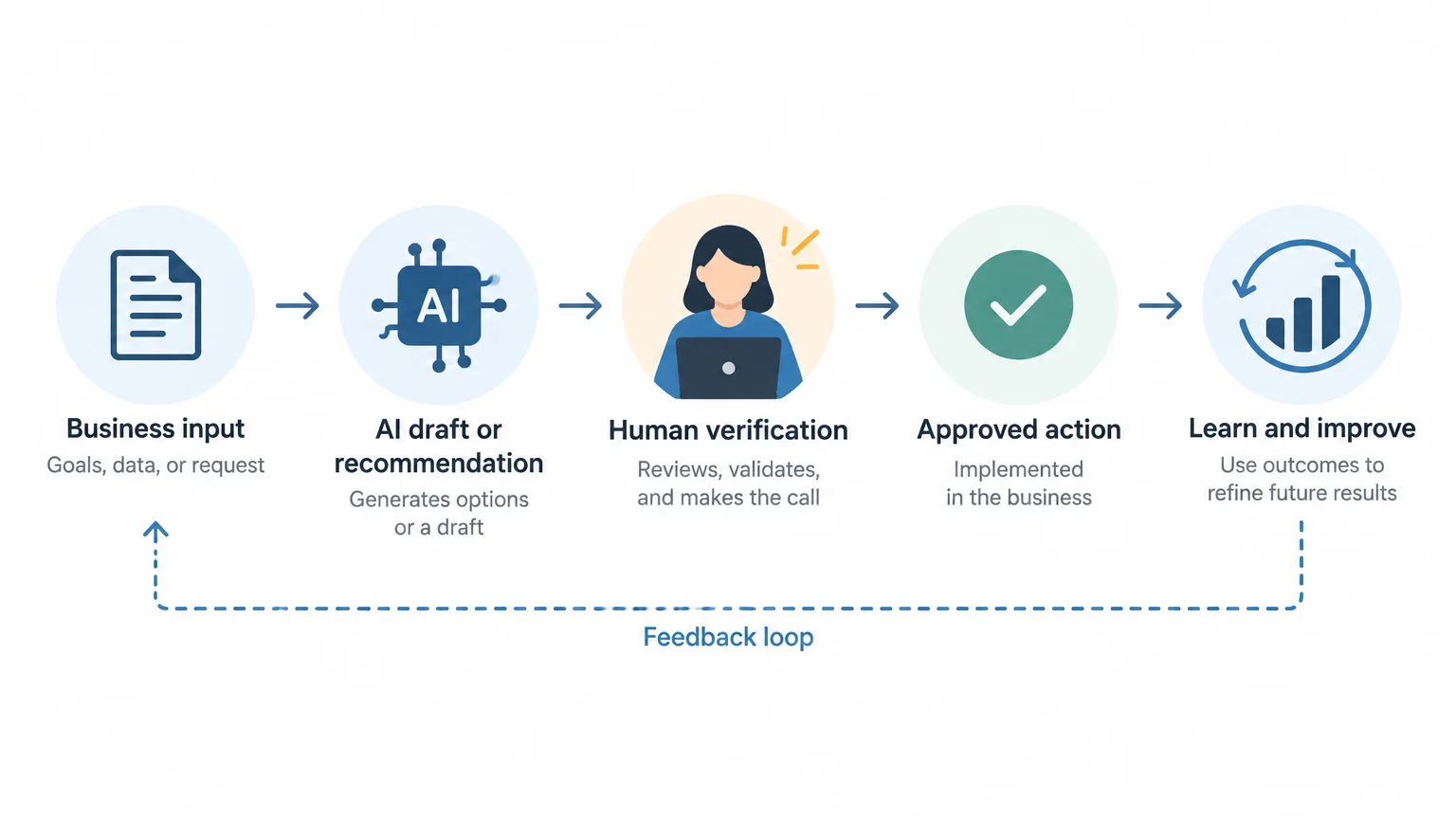
A basic AI-assisted process might look like this:
Business input
    ↓
AI prepares a draft, classification or recommendation
    ↓
System shows the source information and proposed output
    ↓
Human verifies relevant details
    ↓
Human approves, edits or rejects the output
    ↓
Approved action is completed
    ↓
Outcome is recorded for later improvement
The important feature is that the reviewer can see enough information to make a meaningful decision. A simple “approve” button is not sufficient if the person cannot see the source message, relevant customer details or the rules behind the recommendation.
What should a human verify?
The verification checklist depends on the task, but the following categories are useful.
Accuracy
- Are names, dates, amounts and product details correct?
- Does the summary reflect the source material?
- Has the AI introduced information that was not provided?
Relevance
- Does the recommendation address the actual business problem?
- Is the proposed action appropriate for this customer or situation?
- Has the system confused similar requests or records?
Completeness
- Are important exceptions missing?
- Did the AI overlook a customer question or operational requirement?
- Are required fields, approvals or attachments present?
Tone and clarity
- Is the language appropriate for the audience?
- Could the message be misunderstood?
- Does it sound like the organization and reflect its policies?
Privacy and confidentiality
- Does the output reveal information to someone who should not receive it?
- Has sensitive data been copied into an inappropriate message or record?
- Is the workflow using only the information necessary for the task?
Business impact
- What happens if this output is wrong?
- Is the action reversible?
- Should a specialist or manager review it before completion?
Use risk-based verification instead of reviewing everything equally
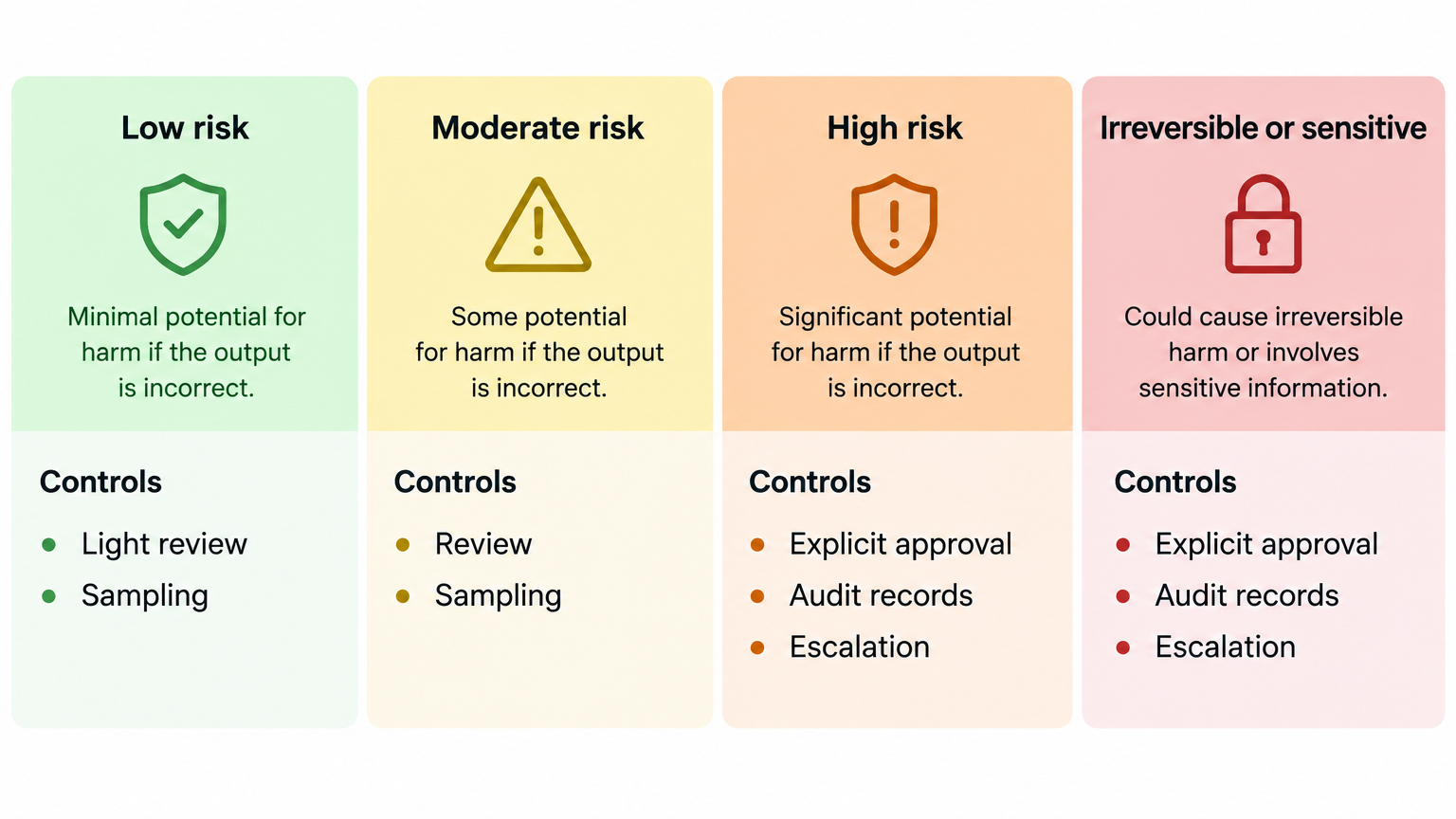
Reviewing every low-risk output in the same way can make automation impractical. A better approach is to classify workflows according to their potential impact.
| Workflow type | Example | Suggested control |
|---|---|---|
| Low risk | Internal brainstorming or first-draft copy | Light review and occasional sampling |
| Moderate risk | CRM categorization or customer-response drafts | Human review before updating or sending |
| High risk | Pricing changes, financial instructions or access decisions | Named approver, documented checks and no automatic execution without approval |
| Irreversible or sensitive | Public publication, deletion, confidential disclosures | Explicit approval, audit record and clear escalation path |
The categories should reflect the business, not a generic template. A small business may consider a particular customer email high risk because of an important relationship, even if the workflow would appear routine elsewhere.
Practical examples of human-in-the-loop systems
Example 1: AI-generated marketing content
An AI system can turn a campaign brief into social media posts, email copy and a blog outline.
Human verification should confirm:
- the claims are supported by the actual offer;
- prices, dates and conditions are correct;
- the content matches the intended audience;
- the wording does not create an unintended promise;
- the final version meets brand and legal requirements.
A useful workflow is to have AI generate several alternatives, while a marketer selects and edits the final version. The AI speeds up ideation and drafting, but the business retains control over what it publishes.
Example 2: CRM activity summarization
An AI system can summarize sales calls and suggest follow-up tasks.
The salesperson should verify:
- what the prospect actually agreed to do;
- the timing of the next step;
- the people involved in the decision;
- objections or requirements that need to be recorded;
- whether the suggested task is appropriate.
Only after this review should the summary update the CRM or create a task for another team member.
Example 3: Customer support triage
AI can categorize inbound requests and suggest priorities. It may identify a billing question, a technical issue or a cancellation request.
Human review is especially important when:
- the message is ambiguous;
- the customer appears distressed or dissatisfied;
- the request involves a refund, account access or sensitive information;
- the classification would determine response time or escalation;
- the system has low confidence or lacks relevant information.
The system should have a clear fallback category such as “needs human assessment.” Forcing every message into an automated category can create more risk than leaving some requests for manual handling.
Design for uncertainty and escalation
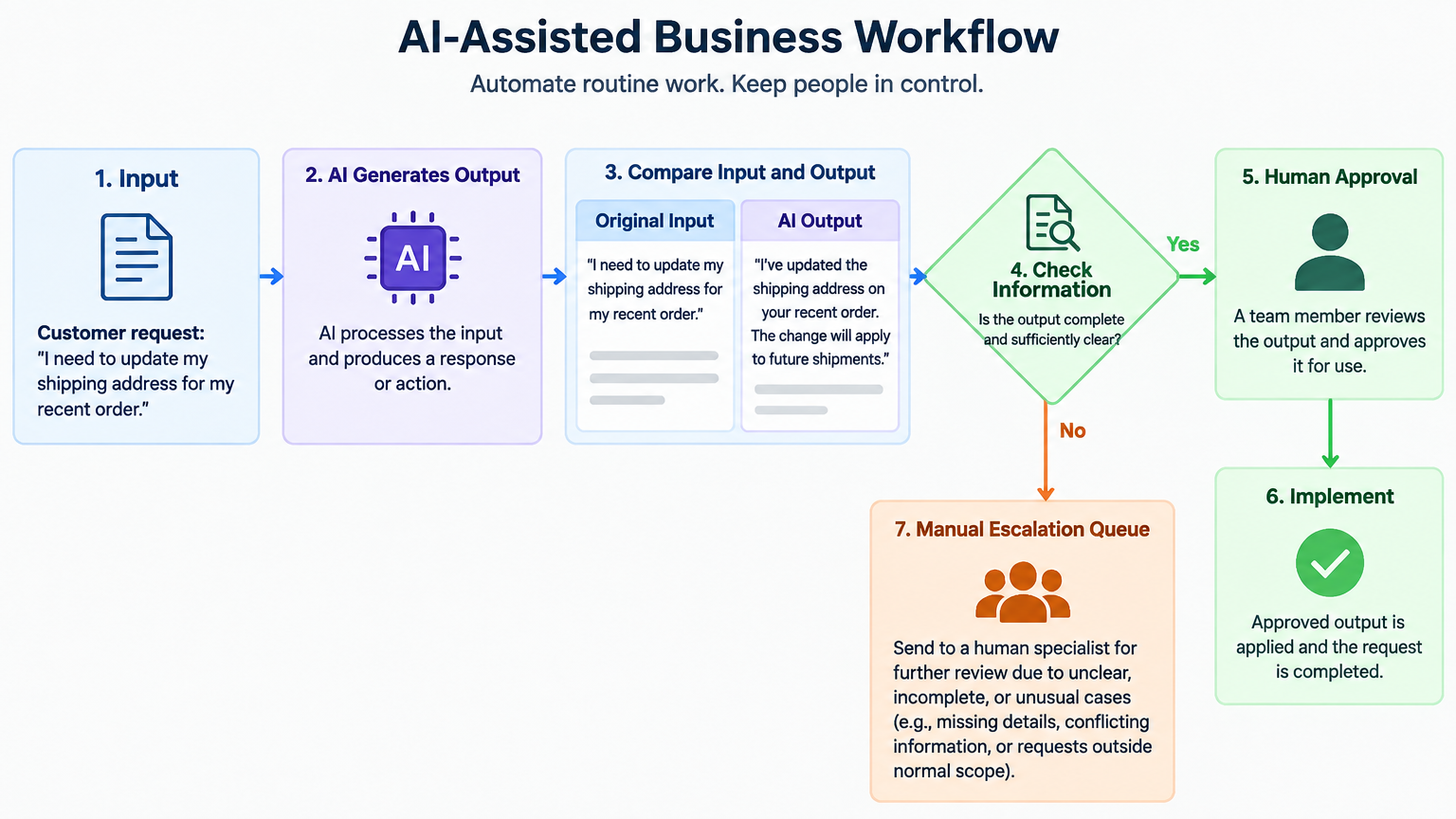
A reliable AI workflow should have a way to express uncertainty. Not every output should be treated as equally reliable.
Possible controls include:
- a confidence or completeness indicator;
- required fields that must be present before an action can continue;
- a second review for high-impact cases;
- a manual escalation queue;
- a rule that prevents external communication when key facts are missing;
- a visible comparison between the original input and the AI-generated output.
These controls do not guarantee that an answer is correct. They make uncertainty easier to notice and reduce the chance that an incomplete output will move through the system unnoticed.
Verification should produce learning, not just delay
When a person edits or rejects an AI output, that event is useful information. It can reveal:
- unclear instructions;
- missing business rules;
- poor source data;
- recurring exceptions;
- tasks that should not be automated;
- opportunities to improve the prompt or workflow.
For example, if reviewers repeatedly change the same type of AI-generated customer response, the issue may not be the model. The workflow may lack an approved response structure, current product information or a rule for handling a specific customer segment.
Track simple operational measures such as:
- number of outputs reviewed;
- number accepted without changes;
- number edited;
- number rejected or escalated;
- common error categories;
- time required for review;
- incidents caused by incorrect outputs.
These measures should be used for improvement, not to pressure employees into approving outputs quickly.
Common mistakes when implementing verification
Treating review as a rubber stamp
If reviewers are expected to approve everything quickly, verification becomes a formality. The process should give them enough time, information and authority to reject an output.
Showing the output without the source
A reviewer cannot reliably check a summary or recommendation without access to the original message, record or document.
Automating before defining the business rule
If the team has not agreed on what a correct result looks like, adding AI will not resolve the ambiguity. Define the decision criteria first.
Ignoring low-confidence or unusual cases
Exceptional cases are often where the greatest risk exists. The workflow should route unusual inputs to a person rather than treating them as routine.
Measuring only speed
A faster workflow is not necessarily better if it creates correction work, customer complaints or inaccurate records. Measure quality and downstream impact as well as time saved.
A practical starting plan for a small business
A small business does not need a complex AI governance program to introduce human verification. Start with one workflow.
Step 1: Choose a repetitive but bounded process
Examples include drafting internal summaries, preparing first versions of customer replies or extracting structured information from standard documents.
Step 2: Define what AI may and may not do
Write down whether AI can draft, classify, recommend, update a record or send a message. Begin with preparation and recommendation before allowing automatic execution.
Step 3: Identify the verification points
Specify exactly what the reviewer must check. Avoid vague instructions such as “make sure it looks good.”
Step 4: Add an escalation path
Define what happens when information is missing, the output is uncertain or the case falls outside normal rules.
Step 5: Test with real examples
Use representative examples, including difficult and exceptional cases. Do not evaluate the workflow only on easy inputs.
Step 6: Record corrections and review outcomes
Use the results to improve instructions, source data, approval rules and process design.
Step 7: Expand cautiously
Only reduce the level of human review when the workflow has demonstrated acceptable performance for the specific business context and the remaining risks are understood.
The goal is controlled automation
Human verification is not an argument for keeping every task manual. It is a way to decide where automation is appropriate and where human judgment must remain involved.
The strongest AI business systems usually combine:
- automation for repetitive preparation;
- clear business rules for routine decisions;
- human judgment for exceptions and high-impact actions;
- records of approvals and changes;
- feedback loops for continuous improvement.
For businesses adopting AI, the key capability is not simply learning how to produce outputs with a tool. It is learning how to design a dependable process around those outputs.
Start with the business problem, define the acceptable result, place verification where risk requires it and measure what happens after implementation. That approach allows AI to create practical value without turning speed into avoidable risk.
Final checklist
Before deploying an AI-assisted business workflow, ask:
- What business problem is this system solving?
- What information does the AI need, and what information might be missing?
- Which errors would matter most?
- Is the output a draft, a recommendation or an automatic decision?
- Where must a person review the result?
- Can the reviewer see the source information?
- What happens when the system is uncertain?
- Which actions are difficult to reverse?
- How will corrections and rejected outputs be recorded?
- What evidence will show whether the workflow is improving the business?
If these questions do not have clear answers, the workflow probably needs more process design before more automation.
Leave a Reply